Find Out What People Complain About on Reddit
No account, no API key, no $99 research tool. The free archive I use, the five words that do the work, and the three places it fights back.
In my first guide I installed a Claude skill that was supposed to tell me what people were talking about. Reddit blocked it, and the thing that saved me was a link I had pasted into a settings box without knowing what it was.
That link was an archive of Reddit. It's free, it's public, and it doesn't care that I can't code.
This guide is that archive on its own. No skill, no install, and for the first half, no Claude either. Just a search box and the right words typed into it.
I ran everything below on September 21, 2026. Including the parts where it told me no.
Why the titles are enough
You don't need to read Reddit. You need to count it.
Someone sitting down to type "I'm stuck and I don't know what to do next" has already done the hard part for you. They named the problem in their own words, in public, with a date on it. Forty people doing that in a year is a market. Four is a Tuesday.
So the whole job is this: count how often a complaint shows up, then read the ones that got the most replies. Titles only. You never have to open a thread to know whether a pain is real.
The archive does the counting. It holds Reddit posts going back years, and it lets you filter them by subreddit, by date, and by a word in the title.
What you need
- A browser. That's the whole list for the first three steps.
- About 20 minutes.
- A Claude account, but only for step 4, and only to save typing. I'm on a paid plan.
No account with the archive. No API key. No credit card. I went looking for the catch and there wasn't one.
The archive is called Arctic Shift, built by Arthur Heitmann. I use it instead of the alternatives for a dull reason that turns out to matter: it's the only free one I found that searches titles inside a single subreddit across a whole year and hands back the comment count. That last field is the one I sort on, and most tools keep it to themselves.
Its own documentation says, and I'm quoting exactly, "No uptime or performance guarantees :)". Take that seriously. This is one person's free service, and further down I'll show you three different ways it said no to me. Don't build a business on top of it. Use it to decide something, then get out of the way.
Step 1: Do one search by hand
Before automating anything, prove the data is there.
Open the search page. Fill in four boxes and leave the rest alone:
- Subreddit:
ClaudeAI - Title:
stuck - After (UTC): a year ago today
- Limit:
100
Hit Search.
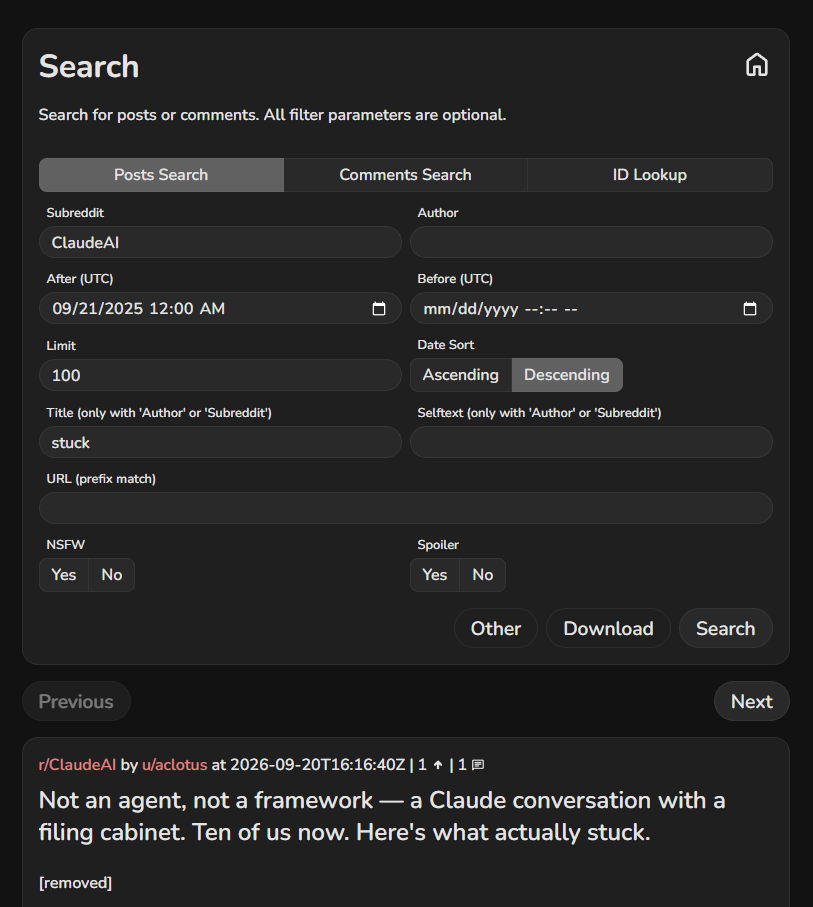
What happened when I tried it: a list of real posts, newest first, each with its subreddit, its author, its date and its score. The top one was from the day before. That's how fresh the archive is.
Two things on this page cost me time. Title only works if you also fill in Subreddit or Author. The label says so. I ignored it anyway. And the dates are UTC, which where I live means the cutoff lands the afternoon before. Neither matters much across a year.
Step 2: Pick the word, not the topic
This is the whole skill, and it's the part that took me longest.
Search content ideas and you get people announcing things. Search stuck and you get people failing at things. Only one of those is worth money.
The archive matches words in the title, in any order. So you want the words a person reaches for at 1am when nothing is working:
| Word | What it drags up |
|---|---|
stuck |
The plain one. Works everywhere, returns the most |
overwhelmed |
Too many options, hasn't started |
confused |
The docs or the pricing didn't land |
give up |
The loudest ones. Usually fewest, usually best |
non-technical |
People who have already put themselves in a box |
What happened when I tried it: stuck beat everything else everywhere I looked, which sounds obvious until you notice what it means. The cheapest word is the most useful one. I spent an hour being clever with phrases and got less out of it than five ordinary words used one at a time.
One word at a time isn't a style preference. Two words means both have to appear in the same title, and titles are short, so you get almost nothing back.
Step 3: Sort by comments, not by upvotes
The search page gives you posts newest-first, and that's the only order it knows. There's a Date Sort toggle and nothing else. You cannot ask it for the most popular.
You have to sort it yourself, and you should want to, because upvotes and replies don't measure the same thing.
An upvote means I agree. A reply means that's me too, and here's my version.
The best example I found today is a post on r/SideProject titled "Genuinely, I want to give up." Four points. Sixty-three replies. By upvotes it's invisible. By replies it's sixty-three people who stopped what they were doing to answer a stranger having a bad day. That's your product description, written by the customer, for free.
What happened when I tried it: in my first run on r/NewTubers, the post with the most replies was "Always motivated and full of ideas but can never actually make anything or get started." Eleven replies. I had walked in certain that creators run out of ideas. The data said the opposite. They drown in ideas and can't start. Everything I'd have built that week was aimed at the wrong problem.
One line, four minutes, and it changed what I'm making.
Step 4: Go wide, one word at a time
One subreddit and one word is a guess. Five and five is a map.
That's 25 searches. By hand it's an afternoon, so this is where I let Claude do the typing. I describe what I want in Vietnamese, it writes the loop, and I don't read the code. What I do instead is check its output against a search I already ran by hand. That comparison is the only quality control a non-coder really has, and it's enough.
If you'd rather stay out of that entirely, run five searches instead of 25. One word, stuck, across five subreddits. Same shape of answer for a tenth of the trouble.
Here's the prompt I use. Paste it in and swap the two lists for your own.
I want to count complaints on Reddit using the Arctic Shift archive.
Write and run a script that does this:

For each subreddit in [ClaudeAI, nocode, SideProject, indiehackers, digitalproducts]
and each word in [stuck, overwhelmed, non-technical, confused, give up], call
https://arctic-shift.photon-reddit.com/api/posts/search
with subreddit, title=<word>, after=<one year ago>, before=<today>,
limit=100, fields=title,num_comments,score,id

Rules:
- Set a User-Agent header with my site or email in it. The default Python one is refused.
- Wait 3 seconds between calls. On HTTP 422 "Timeout. Maybe slow down a bit", wait longer and retry.
- Don't use limit=auto. It's rejected when title is set.
- Print a table of counts per word per subreddit, then the 15 posts with the most comments.
- Only show what the data says. Do not add your own ideas.
That last line is not decoration. Take it out and you get a confident summary of data that never arrived.
What happened when I tried it: 25 searches, twelve months, 1,096 posts after removing duplicates. Here's the raw count.
| Word | r/ClaudeAI | r/nocode | r/SideProject | r/indiehackers | r/digitalproducts |
|---|---|---|---|---|---|
stuck |
100+ | 50 | 100+ | 100+ | 4 |
overwhelmed |
8 | 2 | 100+ | 12 | 0 |
non-technical |
89 | 77 | 100+ | 48 | 0 |
confused |
100+ | 8 | 88 | 15 | 0 |
give up |
17 | 2 | 71 | 14 | 0 |
100+ means the ceiling, not the answer. One search returns at most 100 posts. There's an auto setting that returns up to 1,000, and if you try to use it alongside a title search the archive replies Cannot use "auto" limit with title. So anything showing 100 here is really at least 100. For deciding where to dig, that's enough. I don't need to know if it's 104 or 400 to know it beats 4.
Now the two things the table doesn't show, both of which I only found by opening the results and reading them.
Two-word searches are a lie. The archive matches each word anywhere in the title, in any order. So give up also returns "I built a free Mac app to give an old Pixel a job: backing up Apple Photos." Give, up, match. On r/ClaudeAI it returned 17 posts and only 9 of them contain the phrase. Nearly half that column is noise. Use single words and this stops happening.
r/SideProject looks like the winner and isn't. Every row on that column is high, which had me ready to point everything at it. Then I read them. Of the 100 posts matching overwhelmed, 58 start with I built, I made or I created. They're launch announcements wearing a complaint as a hook: "I was overwhelmed by complex planning apps, so I built Strada." That's a founder pitching, not a customer hurting.
The same count on r/ClaudeAI is 8 posts, of which zero are launches. Eight real ones beat a hundred fake ones. The subreddit you pick decides what a word even means.
So the column worth my time is r/ClaudeAI, and inside it the word is non-technical. Eighty-nine posts in a year from people who open by saying they can't code. The ones with the most replies:
- "The gap between what technical and non-technical people get from AI is huge now" (127 replies)
- "Any tip from technical people to us non-technicals on how to make the most out of claude?" (62 replies)
- "I'm the non-technical person on my team and Claude is quietly the reason nobody's noticed" (53 replies)
- "I've been using Claude Cowork since launch. Here's what actually works for non-technical tasks (no code)." (39 replies)
That's four hours of work already done for me, by the people I'd be selling to, in their own words. I haven't decided what to build yet. But I know which room to stand in.
Where it fights back
Three walls. I hit all three today, and none of them are on the front page of the documentation.
It answers 403 to scripts that don't introduce themselves. My first run failed 50 times out of 50. Every call came back 403 Forbidden and I lost twenty minutes assuming I'd been banned. I hadn't. Python announces itself as Python-urllib/3.12 by default, and that name gets refused. Give it any honest name of your own and the identical call returns 200. If Claude is writing the script for you, tell it to set a User-Agent with your site or your email in it. That isn't a trick to get around a rule. It's the polite version of knocking.
It answers 422 when you go too fast. Not 429, which is what the documentation prepares you for. It's 422, and the body says, in plain English, "Timeout. Maybe slow down a bit". I earned that one by firing requests back to back. Three seconds between calls made it go away. The docs ask you to be considerate and point heavy users at the monthly data dumps instead, which seems fair for something nobody is paying for.
Title search gives up on the busiest subreddits. The documentation says title search is "not supported with very active users or subreddits", and it means it. I changed one box, r/ClaudeAI to r/ChatGPT, and left everything else alone.
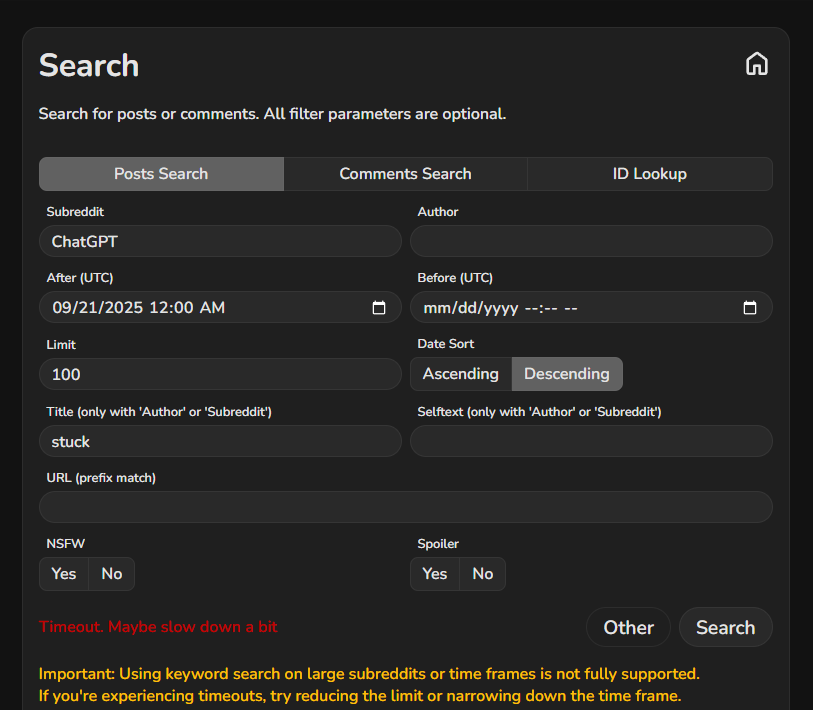
Same word, same year, much bigger room, and it quit. The search page is honest about it: the red line is the error, and the yellow line underneath tells you the two ways out, a smaller limit or a shorter stretch of time.
What makes this one dangerous is the quiet version. Sometimes you don't get red text, you get an empty list, and an empty list looks exactly like nobody complains about this. It isn't the same thing. Always run one search you already know returns something, so you can tell silence apart from absence.
What I do with the list
The counting tells you where to dig. It doesn't tell you what to build. That part has no shortcut and no AI in it.
- Take the three posts with the most replies.
- Open them on Reddit and read the replies. Actually read them.
- Copy five sentences out word for word. Keep the typos and the swearing.
- Those five sentences are your headline, your first email and your sales page.
People describe their own problem better than you will. They've been living in it. Use their words and your page reads like the inside of their head.
What's next
I'm 38, and I still have a 9-to-5. With AI changing what companies need, I don't think any job is safe for the next ten years, and mine is no exception. My wife and I support our two sons, my 75-year-old mom, and a bank loan. All of that rests on one paycheck. Keeping everything in one basket is the risky part, so I'd rather build a second thing now, while the first one is still fine.
So I'm doing it in public. For 21 days I'm building a small digital product with Claude and trying to sell it, one hour a day, with a report every Sunday on this site. Real numbers, including the ones that make me look bad.
This search is how I'm picking what to build. On day 3 I score the candidates and commit to one, and the scorecard goes up here whether or not my favorite wins.
If you run this and something breaks, tell me where you got stuck. Reply to any of my emails, or find me on X.
Nghia Vo
Arctic Shift is a free public service by Arthur Heitmann (github.com/ArthurHeitmann/arctic_shift). I'm not connected to it and I earn nothing if you use it. Nothing I've linked to in this guide pays me. The signup box above is the one paid link on this page, and it says so on its own line. Everything here was run on September 21, 2026, and a free service kept up by one person can change or disappear, so check the numbers yourself before you lean on them.